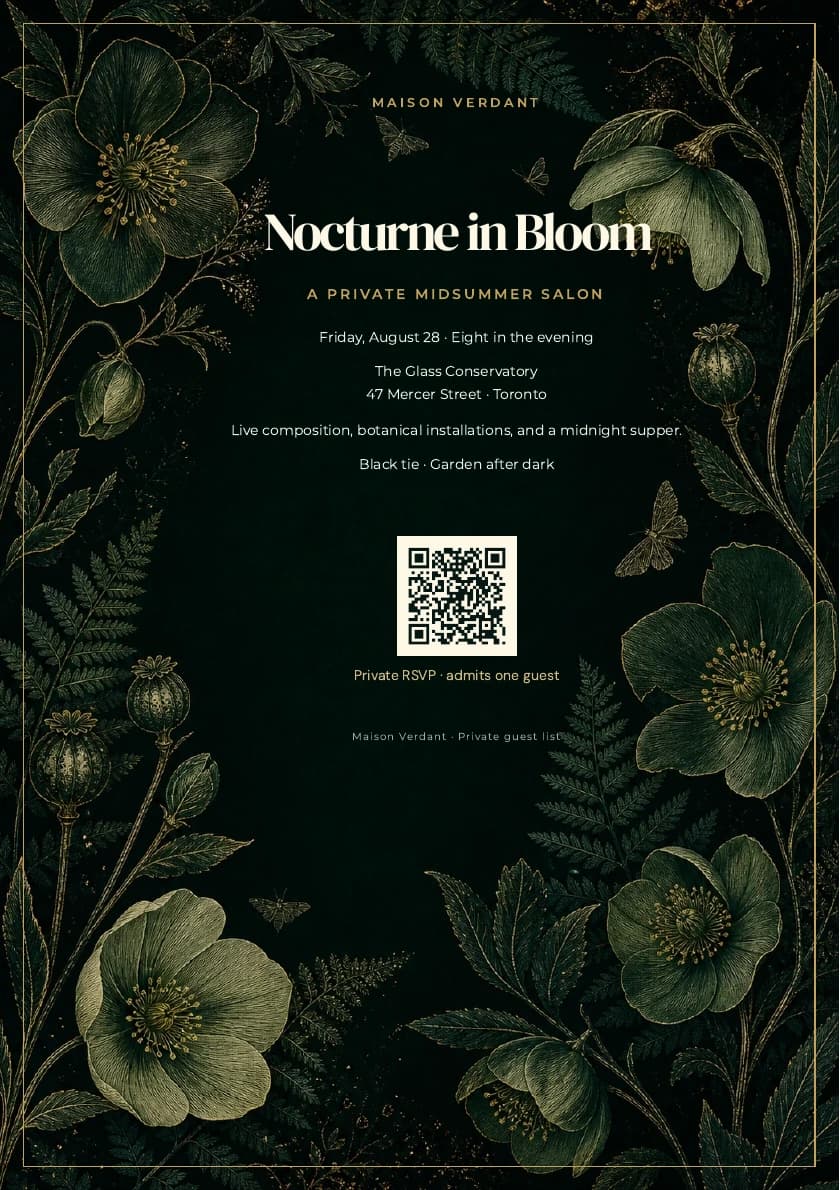
3:45, captured continuously in the real product. The session starts blank, enters every visible design setting, saves the template, renders the exact PDF, and downloads the finished invitation.
Build timeline
| Time | What you will do |
|---|---|
| 0:00 | Start with a blank invitation |
| 0:11 | Create the evening palette and font pairing |
| 0:21 | Add the real event copy |
| 0:26 | Upload the botanical artwork |
| 0:32 | Compose the A5 portrait page |
| 0:47 | Tune the crop, 8% scrim, and gold frame |
| 1:04 | Build the reusable host block |
| 1:29 | Shape the complete event hierarchy |
| 2:22 | Add the high-contrast guest RSVP QR |
| 2:50 | Finish the guest-list footer |
| 3:10 | Save, inspect the exact proof, and export |
Build beside the video
- Open the blank template builder beside the video and pause after each chapter.
- Enter the demonstrated values for an exact Nocturne copy, or replace the host, palette, fonts, artwork, event details, and RSVP destination with your own brand.
- Render PDF proof before saving. The proof and downloaded file use the same production PDF renderer.
For the fastest route, open the ready-made Nocturne starter. You can also inspect the finished A5 invitation PDF before building.
Exact specifications and production checks
The exact design system
| Layer | Demonstrated setting | Purpose |
|---|---|---|
| Page | A5 portrait; 72 / 58 / 48 / 58 px padding | Protects a narrow ceremonial center column |
| Artwork | Centered Cover crop | Keeps the quiet center open while flowers frame the edges |
| Contrast | Midnight green #061713 at 8% |
Stabilizes type without flattening the engraving |
| Frame | Antique gold #c6a15b, 1 px, 18 px inset |
Adds a precise print-safe finish |
| Display type | DM Serif Display, 42 px | Gives the event title ceremony and presence |
| Detail type | Montserrat, 11 px, 1.65 line height | Keeps dates, venue, and instructions effortless to scan |
| RSVP | 94 px QR, Q recovery, ivory quiet zone | Preserves reliable scanning on screens and paper |
The artwork carries the ornament. The typography stays disciplined, and the center column protects the title, event details, QR quiet zone, and guest instruction.
Event Markdown
Keep the invitation short and ordered by importance:
# Nocturne in Bloom

## A private midsummer salon

Friday, August 28 · Eight in the evening

The Glass Conservatory
47 Mercer Street · Toronto

An intimate night of live composition and botanical installations.
Midnight supper by Chef Amara Vale.

Black tie · Garden after dark
The H1 is the emotional promise. The H2 names the occasion. Date and venue follow in plain paragraphs so the reading order remains obvious without extra decoration.
RSVP and proof checklist
- Replace the sample QR value with a stable HTTPS RSVP or registration route.
- Keep a light ivory quiet zone and dark modules; decorative gold codes are less reliable after printing or compression.
- Tell the guest what the code does with a short caption such as
Private RSVP · admits one guest. - Confirm that the event title clears the upper flowers.
- Keep the longest detail line inside the gold frame.
- Check that the footer is subtle but readable.
- Render a new exact proof whenever the artwork, font, frame, page size, or RSVP destination changes.
Export one invitation, open it on a phone, print it at actual size, and scan the RSVP from both versions before sending the full guest list. A signed-up free account includes five premium PDF exports, including custom-template PDFs, so you can test several event details and devices before upgrading.
From Markdown to a finished publication